Compare Google’ Campaign URL Builder with a link management platform like Uplifter and discover which best fits your needs for campaign tracking.
Most marketing analysts already know Google’s Campaign URL Builder. It’s a very simple tool that helps you create a UTM code to track the clickthroughs from a digital marketing campaign. It’s quick, it’s easy, and most importantly, it’s free.
Back in 2016, the tool was added to the Google Analytics Demos & Tools website - a technical resource to help marketers and analysts get more out of GA4 – mostly because, at the time, people were struggling to create UTM codes in a GA-ready correct format. Since then, the market has become crowded with many UTM builders, but Google’s Campaign URL Builder is still the most popular UTM tool in the world.
So, 10 years after its launch, with almost no further development, is the Google Campaign URL Builder still fit for the job? Or has the rise of the Link Management Platform made it redundant?
Why are UTMs important?
So why do we use UTMs at all?
Marketers need to understand which campaigns are working and which aren't. If a channel is not producing traffic cost-effectively, marketing budget needs to be switched into other channels that have a better return.
The simplest way to judge channel performance is to look in Google Analytics at the traffic that converted – and then look at which channel produced those conversions (so-called “last click attribution”). If you add in the cost of generating that traffic, you can figure out the Cost per Sale, or Cost per Acquisition. CPS or CPA per channel is every marketer’s favourite KPI – drill into that data and you can identify the best and worst performing creatives, or placements, or CTAs… You can compare with previous campaigns, or similar campaigns run in different regions.
At least, it’s possible if you have the granularity of data. And this is where UTMs come in…
Invented back in 1996, a UTM is a line of code at the end of a URL that allows GA4 (or any digital analytics platform) to capture more granular data about the ad, post or email that encouraged the clickthrough. Without the right UTM code on your referring URL, GA4 has quite a limited view of the marketing tactic that drove conversion. With the right UTM, marketers can experiment with new ideas and creatives, and see what works and what doesn’t.
But UTMs are fiddly, easily messed up and hard to manage across an organisation. In theory, someone with basic knowledge of a URL coding can write their own UTM code, but in reality this would be slow and hugely error-prone. Even the smallest mistake could screw up the tracking code - and the data would be lost forever.
To avoid such errors, marketers turned to tools like Google's Campaign URL Builder (or maybe spreadsheets that can concatenate separate fields into one long UTM string) to manage the process.
While that works for marketers and analysts who have very simple tracking requirements, Google's free tool wasn't designed to manage the complex needs for governance, collaboration and accuracy that more sophisticated marketing teams will have.
That’s where a Link Management Platform comes in. It’s not free, but it can do a lot more.
Let’s compare the two approaches to UTM management: Google's free builder versus a Link Management Platform. We'll cover the strengths and weaknesses of each, what features are important for teams looking to scale their marketing, and when to consider switching from a free to a paid platform.
By the way, if you are looking for guidance on moving from a UTM spreadsheet to a Link Management Platform, read this article.
What is Google Campaign URL Builder?
Google's Campaign URL Builder is a free tool that helps you build your own tracking links, one at a time.
It supports the three standard required UTM parameters (source, medium and campaign name), plus the two standard optional parameters (term and content). It also offers one of the new GA4 parameters (campaign ID) - but strangely not the other (source platform). You are limited to the 6 parameters it gives you, so you cannot add any customer parameters.
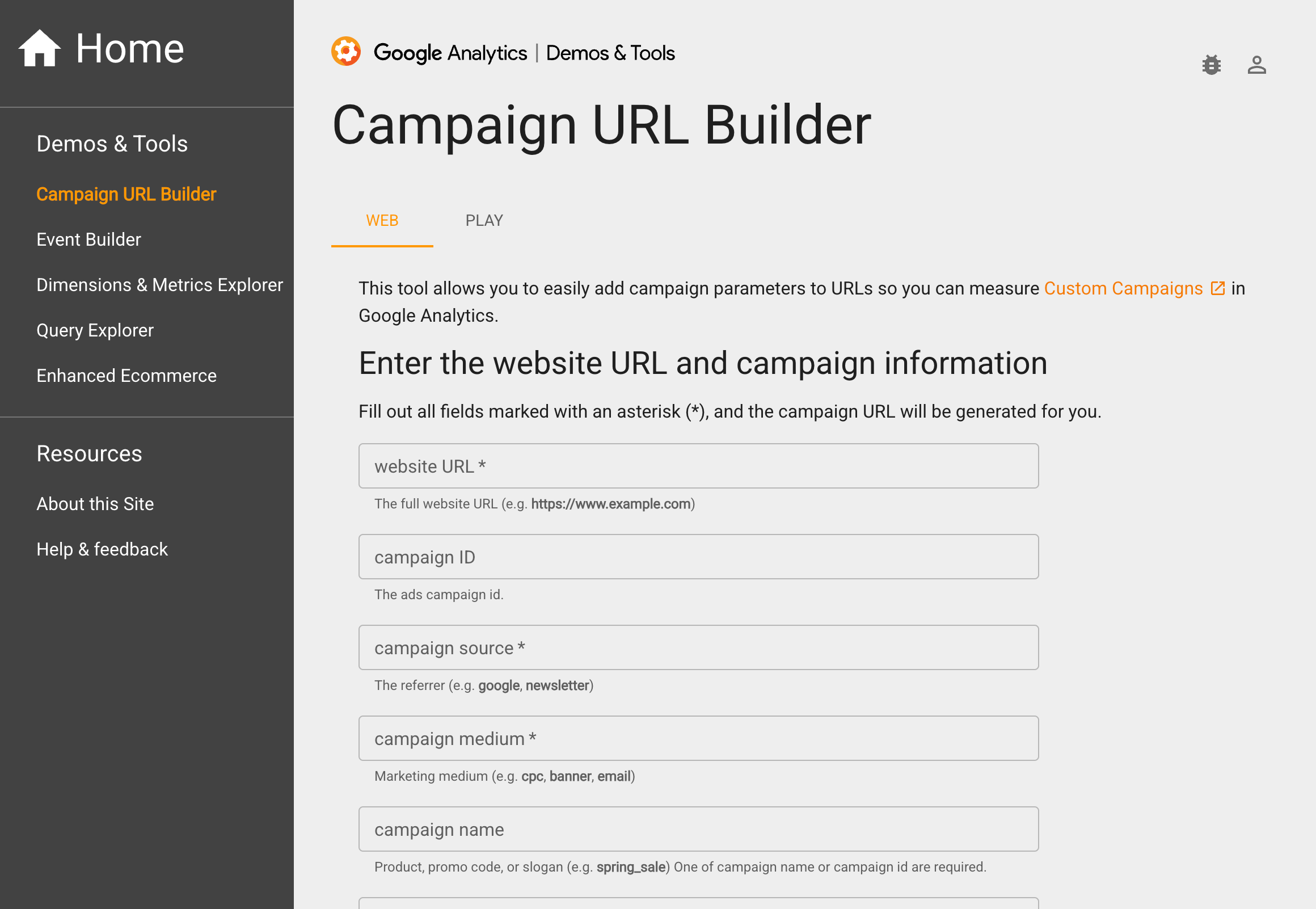
Google’s Campaign URL Builder
How does it work? You type in your landing page URL, and then type the values for each parameter into the blank fields, and a full UTM-appended URL appears below, ready for you to copy and paste into your marketing platform. It couldn’t be easier.
It even has a handy link to Bit.ly for link shortening, but you have to create a Bitly account to make it work, and then you only get 5 free shortlinks before you have to start paying.
The tool works well for creating a small number of links. But it won’t save what you have done, so once you have created your link make sure you have copied it somewhere safe.
It quickly becomes ineffective at scale. If you need 20 links, it’s going to take a while. If you need to use the exact same parameter value that you used last week, you’ll need to have written it down, or you better have a good memory! If you’ve got hundreds of creatives across multiple channels, it is not going to help you.
There's also no governance, nothing to force you and your colleagues to do the same things the same way, without mistakes. So, when you look at your campaign reports in GA4, your data will be a mess – inconsistent naming, duplicate values, source and medium used wrongly, campaign naming conventions that change with each marketer.
What is a Link Management Platform?
First of all, there are dozens of free (or very cheap) UTM tools out there. They do a reasonable job, but have quite limited functionality. There’s not a huge advantage over Google’s builder, except maybe they save your links.
If you have more than a few people in your marketing team, you should be considering an entry level version Link Management Platform (Uplifter for example, has Startup and Business editions, for exactly those sorts of teams).
Teams of over 20 marketers will see their needs dramatically change – the chances of data catastrophe are that much greater, and the impact much more costly. They will need an enterprise Link Management Platform, like Uplifter.
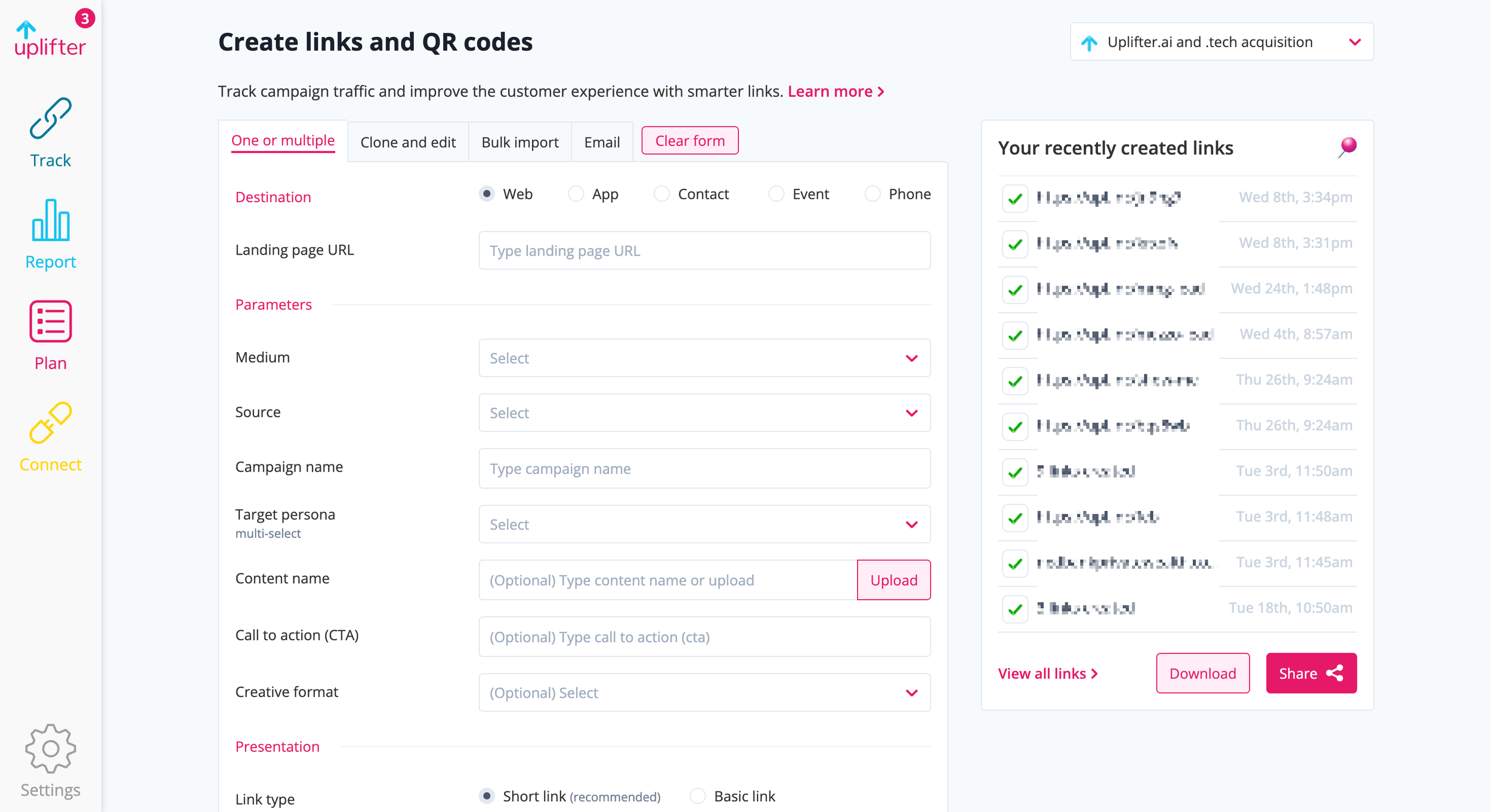
The Uplifter link management platform
Enterprise Link Management Platforms are designed to help larger marketing teams create their own UTM links in an error-free and consistent way. They also help admins to standardize and control the UTM taxonomy – the parameters and values – and force these standards into the marketing process.
These platforms offer scalability and governance features to marketers running complex campaigns across multiple channels, with multiple creatives. They democratize URL generation, enabling different team members in different regions, to create and manage their own UTM links for their respective campaigns - all within a consistent, governed framework.
A key feature of an enterprise Link Management Platform is the ability to add custom parameters to your UTM. Although some marketers are unlikely to need more than the 6 parameters of the Google Campaign URL Builder, the larger the marketing eco system, the more likely your demand for a few custom parameters. For example, if you need to capture the geography you are targeting, you could add utm_region. Or the target demographic, you could use utm_audience. In fact, you could invent ANY custom parameter, as long as you use it consistently.
Another key feature is the ability to produce short links and QR codes in the same platform. This means that ALL your campaign links are created and stored in one place. It is a common problem that a QR code generated for an OOH poster was created by a print marketer who has no idea about adding the tracking code. The result is traffic that comes from the poster, appearing as “Direct” in GA with no data on the campaign, the placement or location – a huge missed opportunity to understand the value of OOH marketing. An enterprise Link Management Platform (LMP) forces them to create a UTM at the same time as generating a short link or QR code.
An LMP is especially useful if you need to change the underlying values in any short link or QR code that is live in the field, for example, when it has been printed on a Direct Mail letter, and you later discover that the landing page URL is wrong. Normally this situation would cause panic in the marketing department. But with an LMP you could simply find the incorrect shortlink (or QR code) in the platform, make the change in a few clicks, hit the Save button, and the problem is sorted.
Another essential key feature is the ability to create different workspaces for different types of user. The needs of the Events Marketing team are quite different to those of the Performance Marketing team. So give each a different workspace where they only get the few options that are useful to them – don’t show them all the parameters and values that were designed for a completely different sort of marketing. This ensures user buy-in as marketers feel that their needs have been accommodated.
How do they compare?
We’ll look at 5 different areas to discover which is the right platform for you.
1. Ease of use
Google's Campaign URL Builder is very easy to use. Because it is simply a HTML-based client-side tool that does not store parameter values, and has no user management, there is nothing to set up. You can get going immediately. For quick, one-off links, just start typing and you get what you need instantly.
However, you need to keep a note somewhere of your standard values for each parameter. Otherwise, GA will collect each variation separately. For example, if you type “facebook” as the source for one link, “Facebook” for another, “fb” and “meta” for others, they will all be tracked separately, and appear in reports as different sources, even though we know they are all the same one.
A Link Management Platform takes a bit more work upfront. You will need to think about your taxonomy, how many parameters you want to use, what values you’ll want to put in each parameter, and who your users will be. It is basically forcing you to define the guardrails that you want all marketers to work within.
Once set up, it should actually be easier for marketers to use. All the dropdowns are there, ready to start building their first tracking link. If a particular value is not there, it will be easy to request a new one, through the platform, and then the admin should be able to accept or decline the request in a few clicks.
Best of all, you should be able to create hundreds of links in a few minutes – each one error-free and saved for future reference. Mature marketing teams can easily create tens of thousands of links each year – it’s good to know that none contain errors or are causing data problems further down the line.
2. User management
We’ve already said that Google’s Campaign URL Builder is just a simple HTML-based tool – there is no concept of different users or of user management.
In larger companies, the marketing campaign manager, who usually is responsible for spending the budget and hitting the commercial target, will delegate the management of each tactic to specialists, with strict instructions to track their work properly. There may be several specialist teams - a paid media team, a social media team, an email marketing team - and then there’s all the people who are not in digital marketing, like events, comms or brand. It’s also very common for entire channels, like paid media, to be run by an external agency – people who often don’t have access to client-side systems.
The challenge is how do we get all those different people to track things the same way and avoid the data catastrophe we described before.
It is also normal for companies to churn staff - or to replace agencies – with old staff leaving, new staff joining, constantly. For anyone leaving, we need to immediately cut off their access to marketing systems. This is often managed through the IT department’s IAM platform that provides Single Sign-On convenience, but also forces global security standards (like 2-Factor Authentication) and the ability to restrict access to certain platforms.
The admin of end-users is built into an enterprise LMP. Usernames, passwords, user hierarchies, access to workspaces, user-level reporting – it’s all part of the system. Integration with IAMs is also fairly standard. IT and infosec teams with ISO27001 and SOC2 requirements, can rest assured that staff can’t get access to company systems after they’ve left.
But what about new starters? Anyone joining a marketing team will want to get up to speed as quickly as possible. They’ll need to understand how you manage campaigns, what the workflow is, and what rules or conventions must be followed. The chances of them making mistakes in UTMs in their first few months is very high, so we’ll want to monitor the links they are creating.
Enterprise Link Management Platforms make this easy. Firstly, they offer online training to new staff members. They then force everyone to track campaigns the same way. They even spot errors while they are being made, and correct them (for example, they will automatically change upper case letters into lower case). They will also allow admins to see all the links created by an individual, and receive alerts if any look wrong.
3. Link management
With Google’s Campaign URL Builder, once you’ve created a tracking link, you have to copy it immediately. The moment you close the browser tab, the link will disappear. There's no record of the link, who created it, when it was created, or whether any traffic went through it. You want to go back later, pick a link you created previously, and use it for another link today? Forget it! It’s gone forever. You want to find out how many times a particular link was clicked on, you’ll need to log into Google Analytics and try to filter the traffic by what you can remember of the parameter values. Good luck with that!
This lack of traceability becomes a major issue over time. Without a proper record of generated links, as people leave, and as memory fades, no one will recall what you used to call that campaign last year, or why there was a big drop in traffic in March.
An LMP solves this by automatically storing every generated URL for future reference. Each link is tied to a standard data taxonomy - you change a campaign name, no problem… the change is tracked and the old data is joined with the new.
4. Data governance
In larger marketing organisations, each region, each channel team, each agency, can end up tracking things their own way – a nightmare when it comes to producing a report on overall performance.
Compound this with confusion about the right way to use UTM parameters… “I know my channel is Email but do I put that in Source or Medium?”. Putting the right value in the wrong parameter, putting the wrong value in the right parameter, misspelling, duplicating and all manner of data quality crimes just lead to a mess when you look in a Google Analytics.
To make matters worse, different marketing platforms apply a few extra technical constraints. Some have a limit on the number of characters in a URL, others get confused by special symbols, and the UTM code can get stripped off entirely if the landing page URL redirects elsewhere in the website. Give the marketers too much freedom and the chances of data catastrophe will be high.
Your boss has asked you to compare the Alpha campaign results of June this year with the same period last year. A straightforward request… You look at the data. It can’t be right. The report is way lower than you expect – and it only seems to show traffic for one channel! And then you realise that the social team have called the campaign alphajune, and the email team has followed the right format but used capital letters, and the media agency is using their own unique campaign ID which makes no sense at all! You are going to need to export ALL your GA data and do a major data cleanup in Excel to give your boss a credible number - and it still might be wrong!
(By the way, if you have passed the entire responsibility of tracking onto your agency, you should read this article: Why your media agency shouldn’t control your UTM tracking)
You need everyone using the same taxonomy, the same UTM parameters, the same UTM values. You want them to have autonomy, but you need keep control. You need governance.
Google's Campaign URL Builder does little to help here. It offers minimal help with how to complete each field. People can type in whatever they want with no format correction, no standard field values, no checking for illegal characters.
An LMP platform, on the other hand, provides governance as part of the process. You can decide whether a parameter needs a pick list of pre-approved values, or whether free text with some data validation is sufficient. It makes it almost impossible to create a UTM that doesn’t conform to your standards. Best practice and quality control is locked in.
5. URL shortening
It is common for marketers to want to use shortlinks instead of a lengthy campaign URL.
Google's Campaign URL Builder has a link to Bitly, the link shortening platform. To make this work, you have to create a Bitly account. This account gives you 5 free links per month. More than that and you will have to pay.
But what happens if you need to change any of the parameters of the underlying link? Bitly only allows you to alter the offending link (what it calls a “redirect”) if you upgrade to a paid plan.
However, if you use an LMP’s shortlink generator, like Uplifter’s Branded Link Shortener, you can make changes to the URL and UTM code in a few clicks. It can even use a client’s own short domain rather than its own generic one (something that Bitly offers, but at significant extra cost).
Bitly will give you a simple report on the number of times a shortlink is clicked on, but link shortening platforms aren’t set up to run reports based on the underlying UTM components.
The real value of the Branded Link Shortener is in the Click Report. Because all links (long, short, QR) are stored in the same platform, an LMP can produce a report of shortlink clickthroughs that are filtered by UTM parameter – like, all the clickthroughs from one media platform. An LMP will also connect to both GA4 and the media server, like Google Campaign Manager/DV360, and pull all the right data back. In the Click Report, you will be able to compare ad clicks with clickthroughs with site visitors. So is the agency over-reporting, or GA under-reporting? Finally, you will know.
6. QR code
Offline marketers love QR codes. But QR code generators expect you to have created the full campaign UTL before they can generate a code.
Google's Campaign URL Builder uses Bitly to create a QR code - but you only get 2 free ones per month before you are forced to upgrade.
An LMP will be able to generate unlimited QR codes at the same time as creating the campaign link, and it allow you to customise the colours, style and favicon of the QR code.
If you use a shortlink to create the QR code you have the added benefit of being able to change the parameter values for every use of the code (for example, if it is printed on a trade show stand, you can use the same stand in different trade shows without have to reprint the QR code – just change the campaign name in the LMP!.
7. Campaign reporting
Every analyst will tell you that, even though all the data that a marketer needs is in Google Analytics, very few marketers actually log in to GA to find the answers to their questions. It is easier to ask an analyst. Which is one of the reasons why analysts spend too little time answering the big questions, as so much of their time answering small requests.
So, the challenge is to encourage self-service reporting.
Google's Campaign URL Builder does little to help here - you will need to build a campaign report in GA4. Bitly provides simple shortlink reporting, but nothing that filters by UTM parameter, without upgrading to a significantly more expensive plan.
As we’ve previously discussed, it’s not that great at ensuring the data is correct, so even if you find the report in GA, it might not make a lot of sense.
An enterprise Link Management Platform like Uplifter should be able to pull back the data from GA to produce a clear and simple report of everything you have done in a campaign. Marketers just need to return to the same place they created the links, to find all the reports associated with those links. It’s a one-stop campaign reporting platform.
You could even set up alerts to tell you mid-campaign if something wasn’t running properly – for example, if traffic had stopped coming through one of your channels because the maximum budget had been reached, or if a large volume of suspicious traffic was coming from one IP address. You’d want to know this immediately and not wait until the end of the campaign.
8. Planning
Once the campaign is over, every marketer should be using the end-of-campaign report to help plan the next one. If they do this now, it is with manual spreadsheets which are error-prone and not built into a closed loop marketing process.
Ideally, the plan for the next campaign should be pre-populated with conversion rates and costs learned from the previous one, so all you need to do is add some budget and you’ve got a clear view of what the forecast ROI would be.
Every CMO (and CFO!) would love this level of assurance about the return on marketing investment. But a disconnected spreadsheet-based process (assuming there even is one!) is almost designed to make this hard.
Obviously, this is so far beyond the scope of Google’s Campaign URL Builder – or even of Google Analytics – that it’s hardly fair to include it in a comparison. But this is where LMPs are heading.
The most advanced enterprise LMPs help you with this process. A Planning module will use the data from the previous campaign to estimate the next one. And Planned vs Actual report will spot any variance and make sure that the learning is captured for all other marketers.
Conclusion
UTMs were invented 30 years ago to help marketers report and plan their campaigns better – and they are still by far the best way to do that.
But marketers need more than a simple URL builder. Marketers need to report and plan at scale, with consistency and accuracy, like never before. In an AI-assisted marketing world, it is no longer acceptable to say “oh I have no idea why that campaign wasn’t tracked correctly”. Simple URL Builders present more of a risk than a solution to modern day marketing.
Five years ago, if you were a solo marketer or a small team running a handful of campaigns, Google's tool might have been fine. It would get your campaigns tracked with minimal fuss and without cost – but with no regard to data quality or how the broader marketing process is managed. Nowadays, even the lowest level digital marketer demands better than this.
As a marketing operation scales, so does the demand for better quality data and more integrated processes. That's where an LMP becomes an essential part of the martech stack. It embeds UTM creation into a scalable marketing process: several critical components of a complex machine in one platform.
If you need scale, accuracy and collaboration, an LMP is less like a nice-to-have and more like an essential tool.
tl;dr
Google's Campaign URL Builder = simple, quick, free, but error-prone
Link Management Platform (LMP) = more costly, but structured, scalable and a critical part of the marketing eco system
Stop managing UTMs in a spreadsheet!
Uplifter gives your team a centralised UTM builder with locked dropdowns, a shared taxonomy, and a full audit trail, so clean data is the default, not the goal.
Free download: UTM governance checklist
33 expert-backed steps to clean UTM data, including the exact spreadsheet structure and the governance layer that makes it work.
Ready to replace your spreadsheet?
Uplifter gives your team a governed UTM builder with locked dropdowns, a shared taxonomy, and a full audit trail. Set up in minutes, not months.
Try Uplifter