
Free UTM builder - generate campaign URLs for marketing analytics
Link copied to clipboard
Create an account to create beautiful, branded QR codes which can be saved as templates.
QR code copied to clipboard
Our free UTM builder is the simplest way to generate campaign URLs with UTM parameters.
The links can be used to track your marketing campaigns in analytics platforms such as Google Analytics (GA4), Adobe Analytics, Matomo, Hubspot, Salesforce and more.
This is the best solution to create no-frills UTMs in small volumes. New? Explore our UTM builder FAQs.
Creating lots of UTMs?
Empower your team to self-serve with our paid UTM builder with a shared taxonomy, audit trail, locked dropdowns, short links and QR codes.



What are UTM parameters?
UTM stands for Urchin Tracking Module, Urchin was a company bought by Google in 2005 to be used in their Google Analytics / Google Ads platforms.
UTM parameters, sometimes known as UTM codes or UTM tags, are the standardised tracking parameters used by most analytics platforms to track marketing campaigns. Think of them as the definitions, while the values you give them determine how they are tracked and measured. Here are descriptions and examples of each UTM parameter:
| Parameter | Code | Description | Example |
|---|---|---|---|
| UTM source | utm_source | Tracks where users came from | google, bing, facebook, linkedin, instagram |
| UTM medium | utm_medium | The type of marketing channel or traffic method | ppc, paid_search, paid_social, organic, social |
| UTM campaign | utm_campaign | The specific marketing campaign, promotion, or initiative that generated the traffic | summer_sale, black_friday, product_launch, brand_awareness, q1_promo |
| UTM content | utm_content | Differentiates between multiple ads, links, or pieces of content within the same campaign | blue_button, header_link, footer_cta, image_ad, text_link |
| UTM term | utm_term | The specific keyword or search term that triggered an ad, primarily in paid search campaigns | running_shoes, crm_software, utm_builder, marketing_analytics_tools, saas_pricing |
A normal URL, the target destination for the user, looks like this:
https://www.example.com/
A campaign URL with UTM parameters looks like this:
https://www.example.com/?utm_source=facebook&utm_medium=social&utm_campaign=black_friday
Why are UTM parameters important?
Put simply, you need UTM parameters to understand where your web traffic is coming from and why.
Understanding this is critical for assessing how your marketing campaigns performed and, therefore, each campaign's return on investment (ROI). Knowing this allows you to plan your future marketing campaigns smarter, backed by data.
Analytics tools like Google Analytics, Adobe Analytics, Kissmetrics, etc., do track a lot of information automatically using referrer data, but UTMs are important because automatic tracking has lots of gaps.
For example, without UTM parameters, GA4 estimates using referrer data. A click from Facebook might just show as: "facebook.com / referral"
But you lose which, campaign, ad, audience and creative that the traffic came from.
Even worse, sometimes links are set to rel="noreferrer" automatically, and in these cases, referrer data isn't even passed, meaning that the traffic is attributed to "Direct / none" or "Unassigned", which is relatively useless information.
What should a campaign URL look like?
A campaign URL should look something like this:
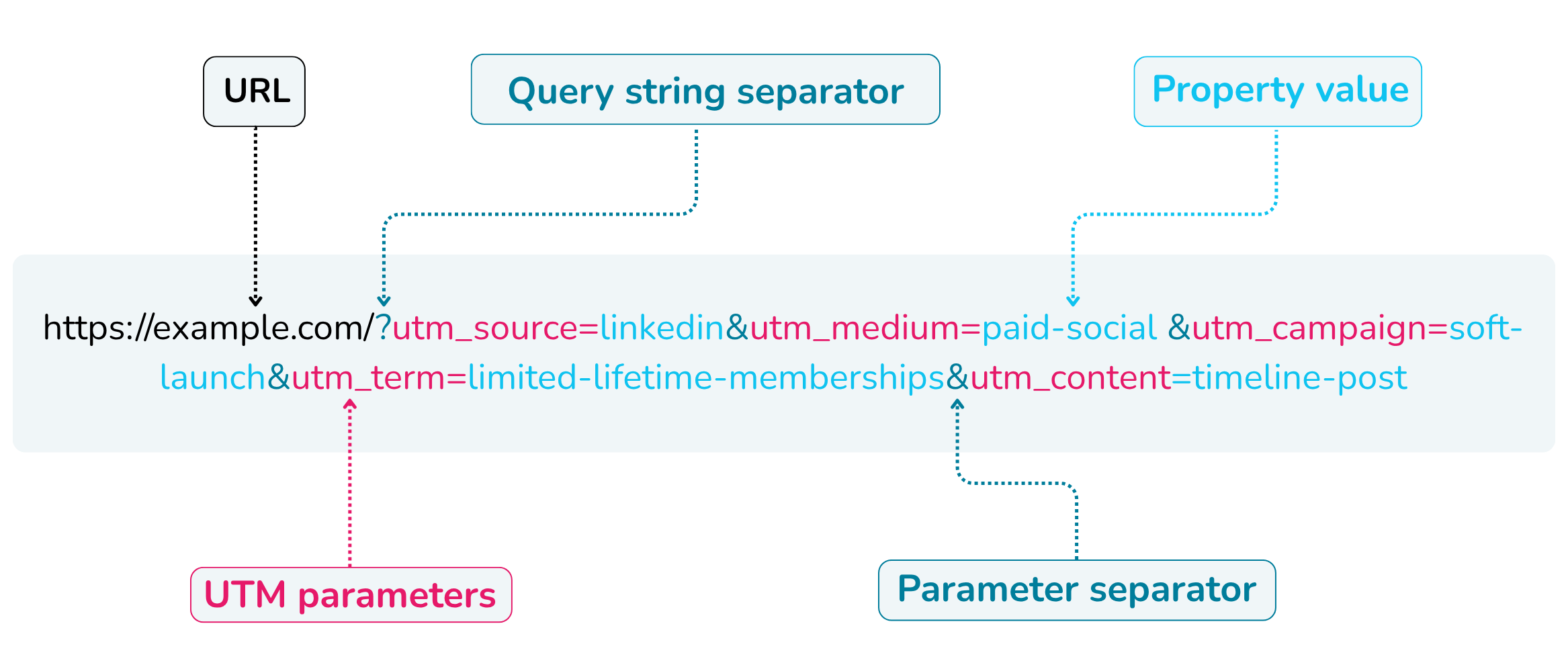
This might look like a lot of information, but it's actually very simple. A campaign URL can be broken down into 5 key sections:
URL: The target URL that you want to send your users to.
Query string separator: The question mark (?), which is the beginning of the query string where the rest of the campaign parameter starts.
UTM parameters: The standardised tracking parameters that measure campaign performance in analytics platforms like Google Analytics 4.
Property values: The specific values assigned to tracking parameters, such as google, email, or spring_sale.
Parameter separator: The (&) character used to separate multiple URL parameters within a query string.
It is possible to build these links manually, but this can be dangerous for marketing attribution. Human errors are very likely when building manually, so it's best to use a campaign URL builder.
UTM naming conventions
It's critical to establish consistent UTM naming conventions. Otherwise, you will attribute traffic to multiple sources, mediums, campaigns, etc.
For example, if you have three campaign links, one with utm_source facebook, another with utm_source FaceBook and the final one with utm_source face_book. The traffic will show as three separate sources in your digital analytics platform.
This is a problem because it makes the marketing campaign look less effective than it actually is, ie, you look worse at your job!
There are no set naming conventions, but we always advocate for clean, simple names that everyone can understand. This way, any other stakeholder who is involved in reporting can easily understand where marketing is attributed and how to create links in the future.
There are a few commonly used naming conventions that you may want to use:
Basic UTMs: Clean, basic UTMs with the values after, nothing added, no abbreviations.
Advanced UTMs: The same as basic UTMs, but also using some or all of the new Google Analytics 4 UTM parameters.
Concatenated parameters: Adding multiple parameters to the prefix or suffix of "utm_campaign", "utm_content" and "utm_term" so you can search and filter by additional parameters.
Hybrid UTM parameters: Using the UTM parameters above, along with custom parameters, makes it easy to split your marketing traffic by parameters important to your organisation. For example, "&product=coffee".
Custom parameters only: This is not recommended, but you can create a fully customised tracking setup by tracking only custom parameters, such as "&product=" OR you can shorten "utm_source" to "source" or even "s".
We have a UTM naming conventions guide if you want to learn more.
UTM builder best practices
You should follow best practices for UTM taxonomy and governance. Standardising your UTM tracking means traffic is correctly attributed to your campaigns and reported with certainty. Below is a table explaining the most widely recognised best practices:
| Area | Best practice | Good example | Bad example | Why it matters |
|---|---|---|---|---|
| Case formatting | Use lowercase consistently | Facebook, FaceBook | Prevents split reporting in analytics tools | |
| Delimiters | Use underscores or hyphens | summer_sale_2026 | summer sale 2026 | Spaces break URLs or get encoded inconsistently |
| Source naming | Standardise platform names | linkedin, google, tiktok | li, LinkedIn Ads, tt | Ensures clean source aggregation |
| Medium naming | Use recognised channel taxonomy | paid_social, cpc, email | paid, ads1, social_media_ads | Enables correct channel grouping |
| Campaign naming | Be descriptive but structured | q1_product_launch_2026 | launch!!! | Improves reporting clarity and filtering |
| Content tagging | Use for variation tracking only | video_ad_1, header_cta | random1, test | Enables creative-level performance analysis |
| utm_term usage | Only for paid search keywords | utm_builder, crm_software | homepage_click | Keeps search intent data clean |
| Consistency | Use a naming convention across teams | paid_social_meta | Mixed formats across teams | Prevents fragmented datasets |
| No personal data | Avoid sensitive or user data | newsletter_signup | john_email_click | Ensures compliance and privacy safety |
| Avoid duplication | Don't duplicate meaning across fields | source=facebook, medium=paid_social | source=facebook_ads, medium=facebook_paid | Prevents redundant or conflicting attribution |
| Encoding | Avoid special characters | summer_sale_2026 | summer/sale&2026 | Prevents URL parsing issues |
| Governance | Use predefined taxonomy | Controlled dropdown values | Free-text entry | Ensures scalability and reporting integrity |
We have a guide on best practices for UTM governance and taxonomy if you want to learn more.
What is a UTM builder?
A UTM builder is a digital tool that helps you to create marketing links, UTM parameters that append to a destination URL. A UTM builder is sometimes called a campaign URL builder.
You can build campaign URLs with a UTM builder using the five basic UTM parameters, utm_source, utm_medium, utm_campaign, utm_content and utm_term.
How to create UTM parameters using our free UTM builder
To create a campaign link, use our free tool above to combine UTM codes. Fill in the free text fields, and your UTM links will automatically be created.
Fill in the free text fields.
Check the campaign link that is generated.
Optionally create a QR code.
Copy the generated link and/or download the QR code to share with your team.
If you're unsure what to put in the fields, read the information below to get yourself up to speed.
Which fields do I need to fill in when using a URL builder?
You only need the destination URL and one UTM parameter as a minimum for most URL builders. We recommend always using Source, Medium and Campaign on every campaign link to follow best practice:
Destination URL: The page you want people to land on (e.g. /pricing or full URL)
utm_source: Where the traffic comes from (e.g., Google, linkedin, newsletter)
utm_medium: The marketing channel type (e.g. cpc, email, paid-social)
utm_campaign: The specific campaign name (e.g. spring_sale_2026)
Optional fields / additional parameters for extra detail if your running campaigns with lots of ad creatives or keywords:
utm_content: Used to differentiate ads or links within the same campaign (e.g. cta_button, banner_ad, video_variant_a).
utm_term: Mainly used for paid search keywords (e.g. crm software).
Does the order of UTM parameters matter?
Not really. The order of UTM parameters does not matter when collecting data. Query string parameters are parsed by parameter name, not by order.
However its worth sticking the same, logical order, most important to least, to:
Make it easier for humans to read and spot mistakes for code visible in the browser.
Avoid truncating important parameters at the end if the link is more than 1024 characters (your browser limit).
We recommend going Medium, Source, Campaign, Content, Term as its more logical for us - even though a lot in the industry go for the legacy order: Source, Medium, Campaign.
How can I use UTM tags for a form submission?
The key idea for passing UTM tags in a form submission is to capture UTM parameters when someone lands on your site and then pass them into the form when it's submitted.
This is usually done by having hidden fields in a form, such as:
utm_source
utm_medium
utm_campaign
utm_content
utm_term
Which are populated using a script from the stored values they came into the site with. Those fields are then passed along with the form into your CRM and are stored.
Example flow:
User clicks ad with UTMs
Website stores UTMs on first page view
User fills in form later
Hidden fields auto-populate
Submission includes attribution data
Do UTM parameters affect SEO?
UTM parameters do not directly affect SEO. But they can cause duplicate URL indexing if canonical tags are missing.
Never use UTM links for internal linking. You can overwrite original attribution, break session continuity and therefore distort reporting.
Limitations of a free UTM builder
A free UTM builder can be incredibly useful for quickly creating links. The problems start to occur as you build more and more campaign links. This is because your UTM links are still prone to errors when created. One typo in a field can break your tracking.
Even without typos, various members of your team might be creating campaign links, but aren't following the same best practices and naming conventions that you are. This quickly descends into data chaos.
You also face the challenge of storing all your campaign links and keeping track of who is responsible for each one.
To help avoid this and to keep things free, you can use a UTM spreadsheet template.
Pros and cons of using a spreadsheet for your UTM building and tracking
UTM spreadsheets are definitely a step up from just using a free UTM builder, but they also have limitations.
UTM spreadsheet templates
UTM spreadsheet templates are useful for tracking the campaign links you and your team have created. You can see who made them, when they were made, and what they were used for, provided you have created those fields in your spreadsheet.
You can also create preset fixed dropdowns to generate UTM links in the spreadsheet. This is essential and should be managed by one admin to keep your taxonomy consistent and campaigns attributed correctly.
Your spreadsheet's validation features should include:
Dropdown menus
Locked formatting cells
Auto-generated URLs
Duplicate detection
Your spreadsheet needs to be configured correctly to keep your data clean. As we are experts in UTM tracking, if you plan to use a spreadsheet, we recommend our UTM spreadsheet template.
When to use a UTM spreadsheet: If you're building up to 20 campaign links per month, a UTM spreadsheet could be OK. But only as long as you are using a good template. And remember, there still can be errors.
The best solution: UTM management software
To ensure that your UTM tracking is error-free, simple and easy to use for everyone on your team, AND that your marketing is attributed correctly, the ultimate solution is to use UTM management software.
Uplifter's UTM management tool has simplified the marketing efforts for even the most complex enterprises. If you're looking to create and govern your UTM tracking for social media, Google Ads, Facebook Ads, LinkedIn Ads, email campaigns, offline marketing strategies and more, you should definitely be using our UTM management software.
Pros and cons of UTM management software
Looking to save your UTM parameters?
Our free UTM builder is great, but it doesn’t save your UTM parameters. If you want more comprehensive UTM governance and taxonomy, you should use proper link management software. This way, you will never experience errors in your tracking. Our link management platform not only standardises your entire campaign links, but allows you to create and manage:
QR codes
Branded shortlinks
App deep links
Custom dashboards
Campaign ROI planning