
The best UTM spreadsheet templates
Most marketing teams start with a spreadsheet for UTM tracking. It works fine until the second person starts using it.
We asked 16 marketers which UTM tracking sheet templates they actually use, what they like, and where they break down. The verdict: every spreadsheet-based approach eventually hits a wall, no matter how well it is built.
Here is what works, what doesn't, and how to know when you've outgrown your sheet.
What is a UTM tracking sheet template?
A UTM tracking sheet template is a pre-built spreadsheet for creating and managing campaign URLs. At minimum it records the five core UTM parameters: source, medium, campaign, content, and term.
The better ones auto-generate the final tagged URL, enforce naming conventions through dropdown validation, and keep a log of every link ever created. Most are built in Google Sheets or Excel.
Some teams use Airtable for a more structured, registry-style setup. The template is just the starting point. The governance process around it determines whether your attribution data stays clean.
What your UTM tracking spreadsheet should include
If you are using a spreadsheet template, you should first have instructions on how the rest of your team should use it.
And then you should have a tab where you actually build your links. We recommend you have the following fields (* means mandatory):
Created by
Created date
Destination URL*
Source*
Medium*
Campaign name*
Keyword (optional)
Ad content (optional)
Campaign link (destination URL with UTMs)
Short URL (optional)
You should also have a tab that manages the drop-down menus. Only one person should manage this, and they should be the designated admin.
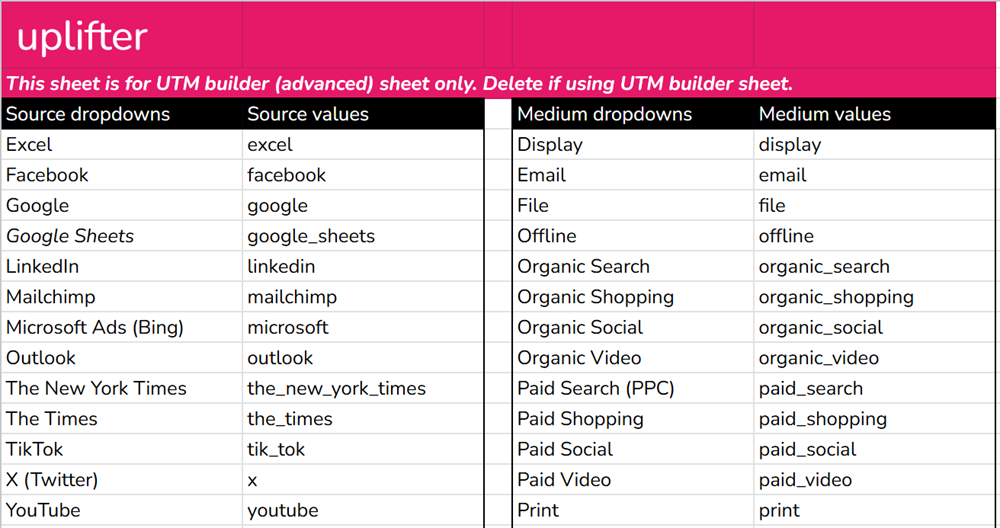
Pre-set dropdowns mean that people follow a strict naming convention. Check out our guide to UTM naming conventions to learn more about this.
"A UTM tracking sheet template should enforce consistent parameter naming across teams to prevent messy reporting in GA/Adobe. It should add basic validation so enterprise marketing and product teams do not generate conflicting UTMs, and create a single audit trail for approvals and ownership, which matters when multiple regions and agencies ship campaigns in parallel."
Igor Golovko, Developer & Founder, TwinCore
Worth noting: Uplifter's UTM management tool replaces the spreadsheet entirely. Locked dropdowns, a shared taxonomy, and a full audit trail. From £24 a month.
Stop managing UTMs in a spreadsheet!
Uplifter gives your team a centralised UTM builder with locked dropdowns, a shared taxonomy, and a full audit trail, so clean data is the default, not the goal.
Most recommended UTM spreadsheet templates
Across all 16 responses, four options came up repeatedly:
Uplifter UTM spreadsheet template: the most comprehensive free option, built by a team that makes UTM builder software. Download the Google Sheets template.
HubSpot UTM tracking template: the most-cited option. Free, Google Sheets-based, with dropdown validation and a campaign log. Download the HubSpot template.
Google Sheets custom builds: often adapted from Uplifter, HubSpot, McGaw.io, SEMrush, or Whole Whale.
Airtable UTM registry: the preferred upgrade path for larger teams that need proper permissions, audit trails, and controlled input fields.
For small teams, any well-structured Google Sheets template does the job. For larger teams or enterprise use, the template matters far less than the governance model wrapped around it.
1. Uplifter UTM tracking spreadsheet template
The Uplifter UTM spreadsheet template is the best option if you are going to use a spreadsheet.
Our entire platform is built around the idea of governing UTM taxonomies and managing your campaign links better.
This includes creating shortlinks, generating QR codes and deep links for apps.
Whilst we do recommend using our software to create and manage your UTM and campaign links, we understand that some people’s needs aren’t as comprehensive as others and that’s why we created the ultimate UTM spreadsheet template.
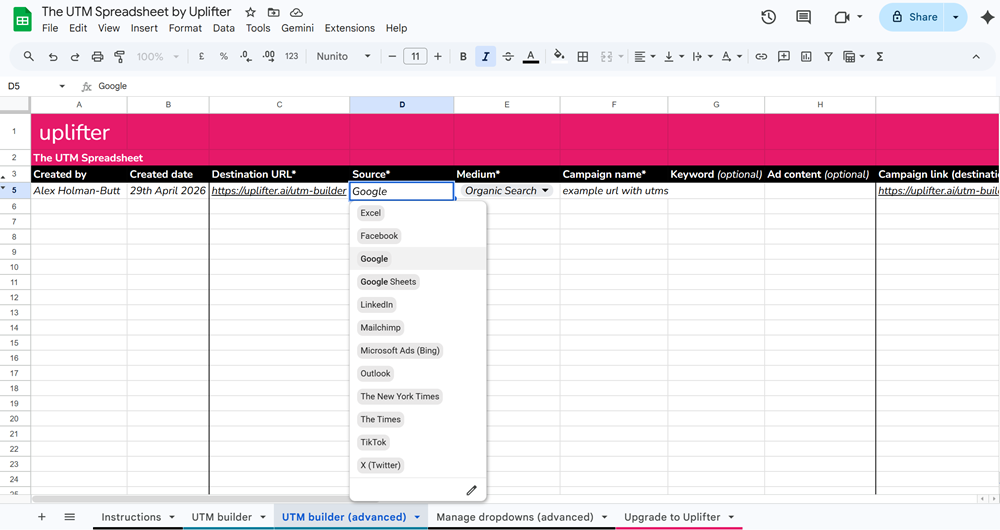
Only one person should govern what appears in the dropdowns; otherwise, everything becomes unstandardised, and you’re back to square one.
2. HubSpot UTM tracking template
HubSpot's free template is built in Google Sheets, includes dropdown validation for each parameter, auto-generates the final URL, and maintains a campaign log.
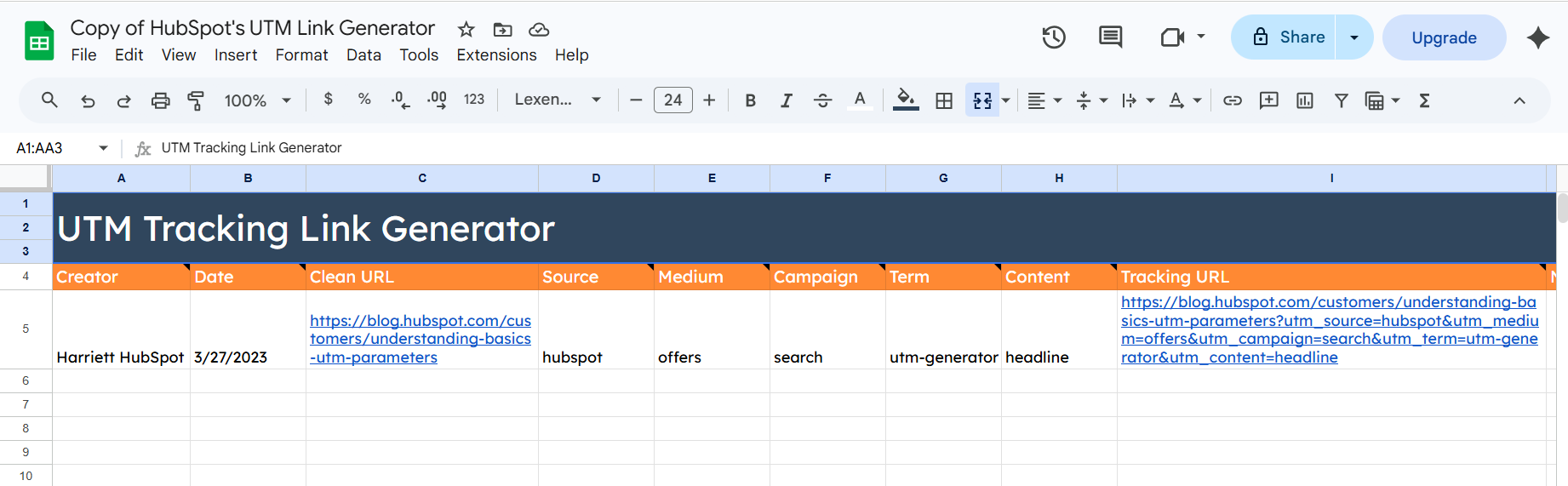
A locked taxonomy tab lists all approved values for each UTM parameter. Anyone building a link selects from this list rather than typing freely. HubSpot's template includes this structure. It is what separates a governed spreadsheet from an ungoverned one.
3. Custom Google Sheets UTM templates
Beyond HubSpot, templates from SEMrush and various digital marketing agencies follow a similar structure: a URL builder tab, dropdowns for source and medium, and a completed links log. For small teams, a well-configured Google Sheets template is often all that is needed.
4. Airtable as a UTM registry
Several experts drew a clear distinction between spreadsheet templates and Airtable-based registries. For teams that have outgrown a shared Google Sheet, Airtable is a structured middle ground before moving to a dedicated tool.
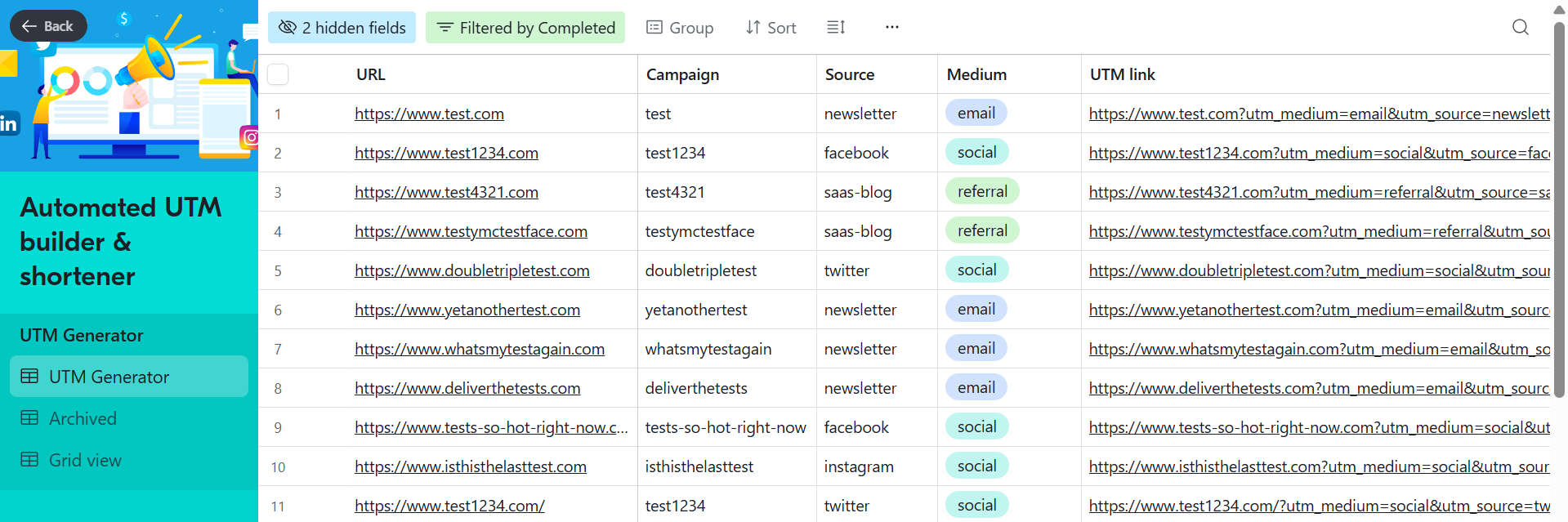
"A registry has a number of features to help manage the UTM link data including but not limited to: - controlled input; controlled access via permissions; ownership field; timestamp; audit trail.
The disadvantage of implementing a registry-based UTM tracking system is that it tends to take more time and more processes to establish before implementation; however, at the end of the day, using a registry should improve consistency in naming conventions for UTM links; reduce duplicate UTM links, and reduce "Mystery UTM links".
Worth noting: The features Airtable adds (controlled input, permissions, ownership fields, audit trails) are what Uplifter is purpose-built to deliver, without the overhead of configuring a general-purpose database tool.
The governance problem every template shares
Every template in this article has the same fundamental weakness: it can document your naming convention, but it cannot enforce it. One person going off-script, typing directly into a URL or creating a link outside the sheet, and your attribution data starts to fragment.
5 reasons your UTM spreadsheet will eventually fail:
No enforcement - Anyone can type anything, dropdowns are guides, not gates.
Version drift - Two people working on different copies. One is out of date, nobody knows which. The wrong one is shared, resulting in duplicated effort.
No audit trail - When data breaks, you can’t tell who created a bad link or when.
Doesn’t scale - 5 team members in a sheet is manageable. At 50, it’s chaos.
Agencies go off-script - External partners rarely follow internal documents.
These five failure modes appear in every spreadsheet template eventually. They are structural, not fixable with a better formula.
The templates that hold up at scale have a governance layer on top:
Dropdown taxonomies with locked approved values (lowercase, no spaces, no special characters)
Ownership fields so every link has a named accountable person
An approval process before any new parameter value is added to the list
Version history so you can trace who changed what and when
Without these, the same source gets entered as "facebook", "Facebook", "FB", and "fb.com". In analytics, those appear as four separate channels. Attribution breaks.
How Uplifter solves this: Uplifter replaces free-text fields with locked, pre-approved dropdowns. There is no box to type "Facebook" in. The governance isn't a document. It's built into the tool. Read the UTM best practices guide.
When to graduate from sheets to a dedicated tool
A spreadsheet is a starting point, not a long-term solution. These are the signs you have outgrown yours:
| Feature | Spreadsheet | Uplifter |
|---|---|---|
| Naming convention enforcement | Documents rules only | Enforces rules automatically |
| Free-text entry | Yes - errors guaranteed | No - dropdowns only |
| Audit trail | Manual / none | Full log, every link |
| Multi-team access | Shared doc - version risk | Single governed platform |
| Works with agencies | Hope they read the doc | Same builder for everyone |
| Time to create a link | Find doc → copy → paste | 30 seconds, governed form |
| Bad data prevention | Zero | Structural - impossible to create |
Spreadsheets offer flexibility and low cost but no enforcement, no audit trail, and hard scale limits. A dedicated tool provides locked dropdowns, a shared taxonomy, a link log with ownership records, and no formula maintenance.
Signs your spreadsheet template has hit its limit
More than one person creates UTM links independently
You work with external agencies or contractors
Your Google Sheet is approaching 5,000 rows and getting slow
You have spotted variant spellings ("fb", "FB", "Facebook") in GA4
You cannot answer "who created this link?" in under two minutes
You have had to explain the naming convention to someone more than once
A team member has bypassed the sheet and created a link manually
The spreadsheet does not fail because it is poorly built. It fails because it cannot enforce its own rules. And in large organisations, the manual approval process itself becomes a bottleneck that delays campaign launches.
"For teams larger than about 20 marketers, I would honestly recommend graduating to a dedicated tool like Uplifter or CampaignTrackly rather than stretching a spreadsheet beyond its limits."
Shehar Yar, CEO, Software House
What to do next
For most small teams, the Uplifter UTM spreadsheet or the HubSpot version, modified with locked dropdowns, a taxonomy tab, and a link library, is the right starting point.
For anyone managing more than 5 marketers, running hundreds of campaigns, or working with external agencies, a purpose-built tool is the only sustainable option.
The template is the easy part. The governance model around it determines whether your attribution data holds up at scale.
Free download: UTM governance checklist
33 expert-backed steps to clean UTM data, including the exact spreadsheet structure and the governance layer that makes it work.
Ready to replace your spreadsheet?
Uplifter gives your team a governed UTM builder with locked dropdowns, a shared taxonomy, and a full audit trail. Set up in minutes, not months.
Try Uplifter for free